
Emelowsky Plugins / Track Drop
Track Drop for REAPER
Delivered tracks land exactly where you want them in your mix template - one click per move.
What it does
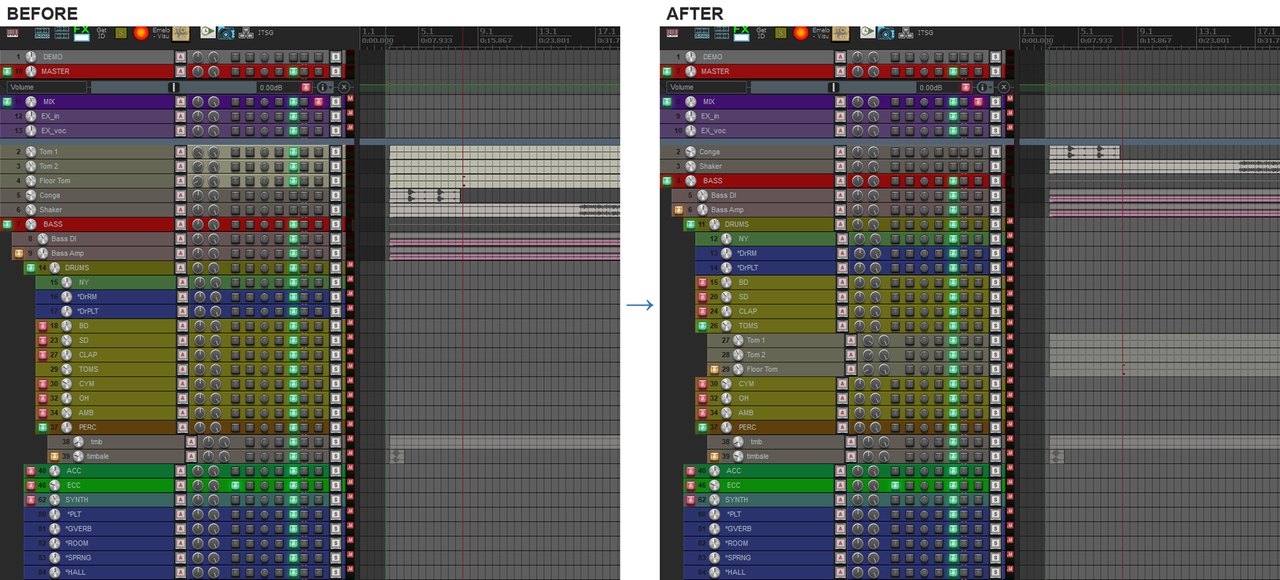
You mix with your own template, and the session you get has its tracks in a different order. Track Drop sends the selected tracks into any folder of your template with one click, without ruining the layout of your session. Click a normal track instead, and it becomes a new folder with the selected tracks inside.
- Select tracks, click the target folder in the list - done
- Folders move with everything inside, the folder structure stays intact
- Click a normal track to turn it into a new folder for the selection
- Search by word fragments in any order
- Last target at the top: press Enter to send the next selection there again
- Every move is one undo step
Free demo: up to 3 tracks per move. Unlock the full version with a key - no reinstall.
Install
Gumroad: download the zip from the product page and follow the quick start guide inside.
ReaPack: Extensions > ReaPack > Import repositories, paste https://raw.githubusercontent.com/Emelowsky/reapack/main/index.xml, then find Track Drop in Browse packages.
Requires: REAPER 6 or 7 (Windows, macOS, Linux) and the free ReaImGui extension (ReaPack).